J4T Multitrack Recorder
JaytronixMusic & Audio
4.2788.00 Reviews
- Version
- 4.95
- Installs
- 50.00K
- Age Rating
- Everyone
Screenshots
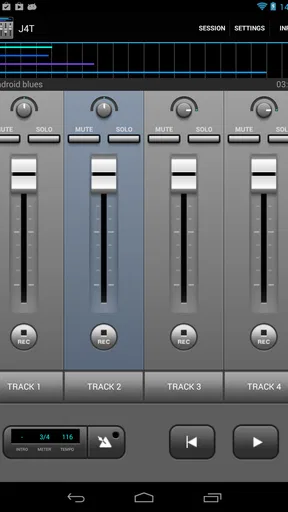
Our Review of J4T Multitrack Recorder
 Analysis by Appyee
In a shared home, a musical idea rarely arrives when everyone else is ready to listen. I like having a recorder on hand for the quick moments: a melody hummed in the kitchen, a guitar phrase tried between chores, or a voice note that needs more than a single take. J4T Multitrack Recorder is aimed at that practical kind of music-making, giving you a way to build a small layered recording on a mobile device rather than leaving an idea until you can get to a larger setup.
A recorder that fits around everyday life
For a household, the most useful role is often modest. One person can capture a tune without taking over a shared computer or setting up a full recording space. Another can listen later, offer feedback, or add a part when the room is free. That makes a phone or tablet a handy starting point, though it does not turn a shared device into a shared music account: anyone using it should agree where projects are kept and who is allowed to edit or export them.
A realistic session might begin with a guitar idea recorded before dinner, then continue later with a vocal line or a second instrument. Because the app supports multiple tracks, you can keep those parts separate while shaping the arrangement. That is more useful than repeatedly recording over one mixed take, especially when you want to compare a new phrase with the original without losing it.
Keeping projects and devices in order
Before several people use one device, I would settle on a simple naming habit: include the creator’s initials or the instrument in each project name, and avoid leaving several drafts called “new song.” That small routine matters more than it sounds. It makes it easier to find the right session later and reduces the chance of someone changing a sibling’s unfinished idea by mistake.
I would also treat exporting as a deliberate handoff rather than an automatic backup. Save a finished copy somewhere the intended collaborator can reach, and keep the editable project on the device only if everyone sharing it is comfortable with that arrangement. The app’s export options are useful for sharing a listenable result, but an exported audio file is not the same thing as a project that another person can continue editing.
This distinction helps answer a common practical question: can someone simply pass a recording to another person? They can share an exported version, but for ongoing collaboration, agree on whether the other person needs to hear the mix or work on the separate parts. A finished file is convenient for feedback; separate track work calls for clearer coordination and a suitable way to transfer the project.
Who will enjoy the four-track approach?
The limited track count is a useful boundary for quick demos. A singer-songwriter can try a basic arrangement with a rhythm part, harmony, lead vocal, and one extra layer without facing a sprawling session. It encourages decisions: if an idea does not fit, you can simplify it or replace a layer rather than endlessly stacking parts. For sketching, that constraint can keep the focus on the song.
It is less suited to someone planning a dense production with many instruments, detailed automation, or the broad mixing and routing options expected from a desktop digital audio workstation. In that situation, I would use this app to capture the seed of a track and move to a more capable setup for the finished production. It is also not the best pick if your main goal is a polished podcast workflow with dedicated episode management; its multitrack recording tools can help with spoken audio, but they are not a substitute for a production process built specifically around podcasts.
Where it sits beside other recording options
Compared with a basic voice recorder, the advantage here is the ability to layer and edit parts instead of treating a recording as one continuous take. Compared with a full DAW, the trade-off is simplicity and portability in exchange for fewer tracks and less room for elaborate production. That middle ground is the point: it is a scratchpad for arrangements, not a claim that a phone can replace every studio tool.
Importing audio gives you another useful route into a project. For instance, you can bring in a backing idea and record a melody over it, or use a previous recording as a reference while trying a new part. I would keep a clean copy of the imported source elsewhere before experimenting. That makes it easier to revisit the original if edits take the session in an unexpected direction.
For the clearest results, I would record in the quietest room available and make a short test before committing to a full take. A phone placed near a fan, window, or busy kitchen can capture distractions along with the performance. Listening back through headphones also helps catch a clipped entrance or unwanted room noise before you add more layers; once several parts are stacked, small problems are harder to diagnose.
Age, trust, and shared use
The app is rated for Everyone, and its purpose is straightforward: recording and editing audio. That makes it understandable for a young musician to explore with an adult nearby, but an age label does not settle household rules about publishing recordings or sharing personal information. I would keep younger users’ first projects private and talk through where an exported track is going before it is posted or sent beyond the family.
SoundCloud sharing can be convenient when a creator is ready to show a track, but it is still a public-facing choice that deserves a pause. In a family setting, I would make sure the person who made the recording wants it shared and understands the destination. For children, a parent or guardian should guide that decision; the app should not be treated as a replacement for supervision or a family sharing policy.
Cost and expectations
J4T is a paid music-and-audio app from Jaytronix, priced at $3.49. Its average rating is 4.2 from around 2,300 ratings, and it has over 50,000 installs. It first appeared on November 11, 2010, and the current version is 4.95, with Android 7.0 as the minimum operating system. I would think of the price as paying for a focused recorder rather than buying a complete production suite: the value depends on whether you will actually use its separate tracks and editing tools.
If you only need to capture spoken reminders, a simpler recorder may be quicker. If you want deep control over a finished album, a full DAW is the more sensible destination. But for a person who regularly has musical ideas away from a studio, the ability to capture, arrange, and export a compact demo in one place is a more relevant comparison than a long list of advanced features.
J4T Multitrack Recorder is a practical choice for musicians who want to sketch arrangements, experiment with layers, or share a rough mix without setting up a computer. I would recommend it to a household with a casual songwriter or a couple of collaborators who can agree on project names and handoffs. I would skip it for complex productions, extensive podcast editing, or a shared-device situation where nobody is willing to keep projects organized.
For my own use, the best approach would be to treat it as a fast capture tool: record the idea, add only the parts that clarify it, then export a version for feedback. That keeps expectations realistic and makes the app more useful than trying to force it into the role of a complete studio. If that is the kind of music-making you have in mind, it offers a straightforward way to turn passing inspiration into something you can replay and develop.
First Impressions
When you first open the app, you’re greeted with a clean and simple interface. It doesn’t bombard you with flashy graphics or unnecessary frills, which I find refreshing. The main screen is straightforward, allowing you to dive right into your recordings without getting lost in a maze of options.
Setting the Stage
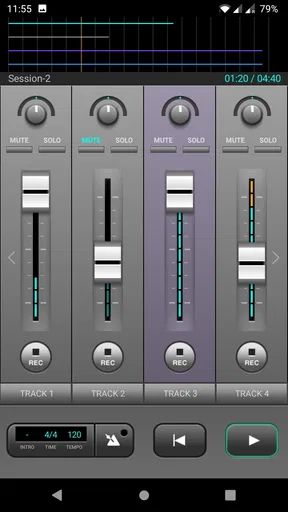
Getting started is a breeze. You can quickly create a new project and start recording your ideas. The app offers up to four tracks for you to play around with, making it perfect for layering your music. Whether you’re a budding musician or just want to record some podcast segments, having these multiple tracks is a game-changer.
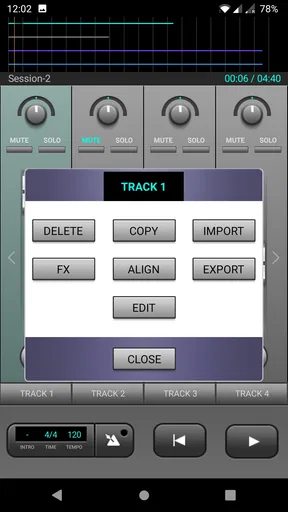
One of the standout features is the app's ability to import existing audio tracks. This means you can bring in background beats or previous recordings to enhance your current project. It’s a handy tool for those who like to experiment with different sounds and layers.
Recording and Editing
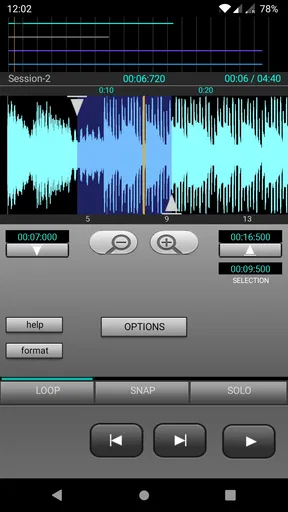
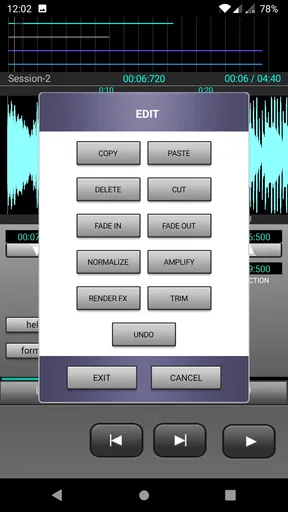
Recording with the app is as easy as tapping a button. The quality is surprisingly good for a mobile app, capturing the nuances of your voice or instrument with clarity. Once you’ve got your tracks down, the editing tools come into play. You can cut, copy, and paste sections of your recording, giving you the flexibility to arrange your masterpiece just the way you want it.
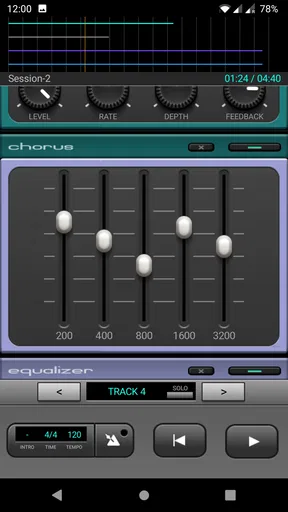
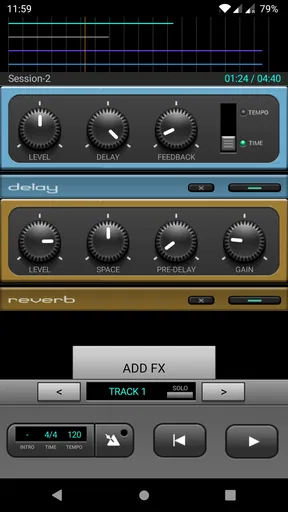
Another nifty feature is the app’s onboard effects. You can add reverb, delay, and other effects to spice up your recordings. It’s not as comprehensive as a full-fledged DAW, but it’s enough to give your tracks that extra bit of polish.
Sharing Your Creations
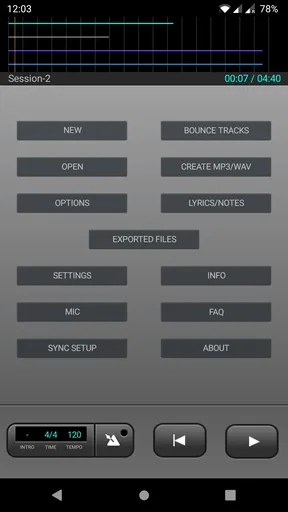
After perfecting your tracks, you’ll likely want to share them with the world. The app makes this process straightforward. You can export your recordings in various formats, including MP3 and WAV. Whether you’re sharing with friends or uploading to a platform, it has got you covered.
Plus, for those moments of inspiration on the go, the app allows you to upload directly to SoundCloud. This seamless integration makes it easy to build and share your musical portfolio, no matter where you are.
Usability and Performance
I’ve used the app on both Android and iOS, and it performs consistently across devices. It doesn’t hog system resources, so you won’t have to worry about your phone overheating or crashing mid-session. The developers seem to have put significant effort into ensuring a smooth user experience.
The app is regularly updated, which is always a good sign. Updates bring new features and improvements, ensuring you’re working with the latest and greatest version. It’s reassuring to know that the developers are actively maintaining and enhancing the app.
Final Verdict
In summary, J4T Multitrack Recorder is a fantastic tool for anyone looking to record and edit audio on the go. Its simplicity, coupled with a robust feature set, makes it an excellent choice for musicians, podcasters, and audio enthusiasts alike. While it might not replace a professional studio setup, it’s a powerful companion for capturing those creative sparks whenever and wherever they strike.
If you’re in the market for a reliable multitrack recorder that fits in your pocket, give this app a whirl. You might just find it becomes an essential part of your creative toolkit.
Verdict
Strengths of J4T Multitrack Recorder
- User-friendly interface for easy navigation.
- Supports multiple audio formats for flexibility.
- Low latency for real-time recording.
- Integrated effects for enhanced audio quality.
- Export options for sharing and backup.
Limitations of J4T Multitrack Recorder
- Limited track count in free version.
- Occasional crashes on older devices.
- Interface design feels outdated.
- Requires in-app purchases for full features.
- No built-in cloud storage integration.
Similar Picks in This Category
View All
YouTube Music
Google LLC4.4

Samsung Music
Samsung Electronics Co., Ltd.3.8

Spotify: Music and Podcasts
Spotify AB4.3

JioSaavn - Music & Podcasts
Saavn Media Limited4.3

Lark Player:Music Player & MP3
Lark Player Studio - Music, MP3 & Video Player4.6

StarMaker: Sing Karaoke Songs
SKYWORK AI PTE. LTD.4.3
Frequently Asked Questions
What is J4T Multitrack Recorder used for?
J4T Multitrack Recorder is a versatile audio recording app designed for musicians and audio enthusiasts. It allows users to record multiple tracks, layer sounds, and create complex audio compositions right from their mobile devices. Ideal for sketching song ideas or producing full tracks, it’s a powerful tool for on-the-go creativity.
Is J4T Multitrack Recorder suitable for beginners?
Yes, J4T Multitrack Recorder is user-friendly and suitable for beginners. The intuitive interface makes it easy to navigate, allowing users to quickly start recording and layering tracks. Tutorials and online resources are available to help new users understand its features and maximize their creative potential.
What audio formats does J4T Multitrack Recorder support?
J4T Multitrack Recorder supports various audio formats, including WAV and MP3. This flexibility allows users to export their recordings in high-quality formats suitable for further editing or sharing across different platforms. Ensuring compatibility with other software and devices makes it a convenient choice for many users.
Can I use external microphones with J4T Multitrack Recorder?
Yes, J4T Multitrack Recorder supports the use of external microphones. This feature is beneficial for users seeking higher audio quality or specific recording needs. By connecting a compatible microphone to your device, you can enhance the clarity and detail of your recordings, making it a great option for professional audio projects.
Are there in-app purchases or additional costs in J4T Multitrack Recorder?
While J4T Multitrack Recorder offers a comprehensive set of features in its base version, there may be additional in-app purchases available. These purchases often include extra sound packs or advanced tools to enhance functionality. Users should review these options to decide if they align with their creative needs and budget.
